Virtu Desktop
Virtu Assisted Mastering is available both as a Desktop Application and as an Online Service. While both platforms provide the same streamlined audio-mastering workflow, this User Guide focuses specifically on the Desktop Application.
Virtu Desktop is included in the Complete Access subscription and is also available to users who have purchased a perpetual license through our Shop. As with our plugins, you can install this application via the Complete Access Hub or by downloading the installer from our installers page.
Importing a Track
Drag a stereo audio file into the interface, or click the Import button to load a track for mastering. Major formats such as .wav, .aif, and .mp3 are supported.
Once imported, the Mastering Studio will appear.
You can adjust various parameters that guide the mastering process. These settings can be changed while the track is playing, allowing you to instantly hear the impact of your adjustments. This real-time preview capability is exclusive to the Desktop Application and is not available in the web version of Virtu.
At any time, you can compare the mastered version to the original by toggling the Original / Mastered button in the player. Enable Level match to hear both versions at the same loudness. This gives you a fair comparison and helps you understand how the mastering process affects your audio beyond simple volume changes.
Style
These controls influence the overall EQ character of the final master.
In addition to the 6 built-in genres, you can import a Reference track. Virtu will use the EQ profile of the track as the target for the master.
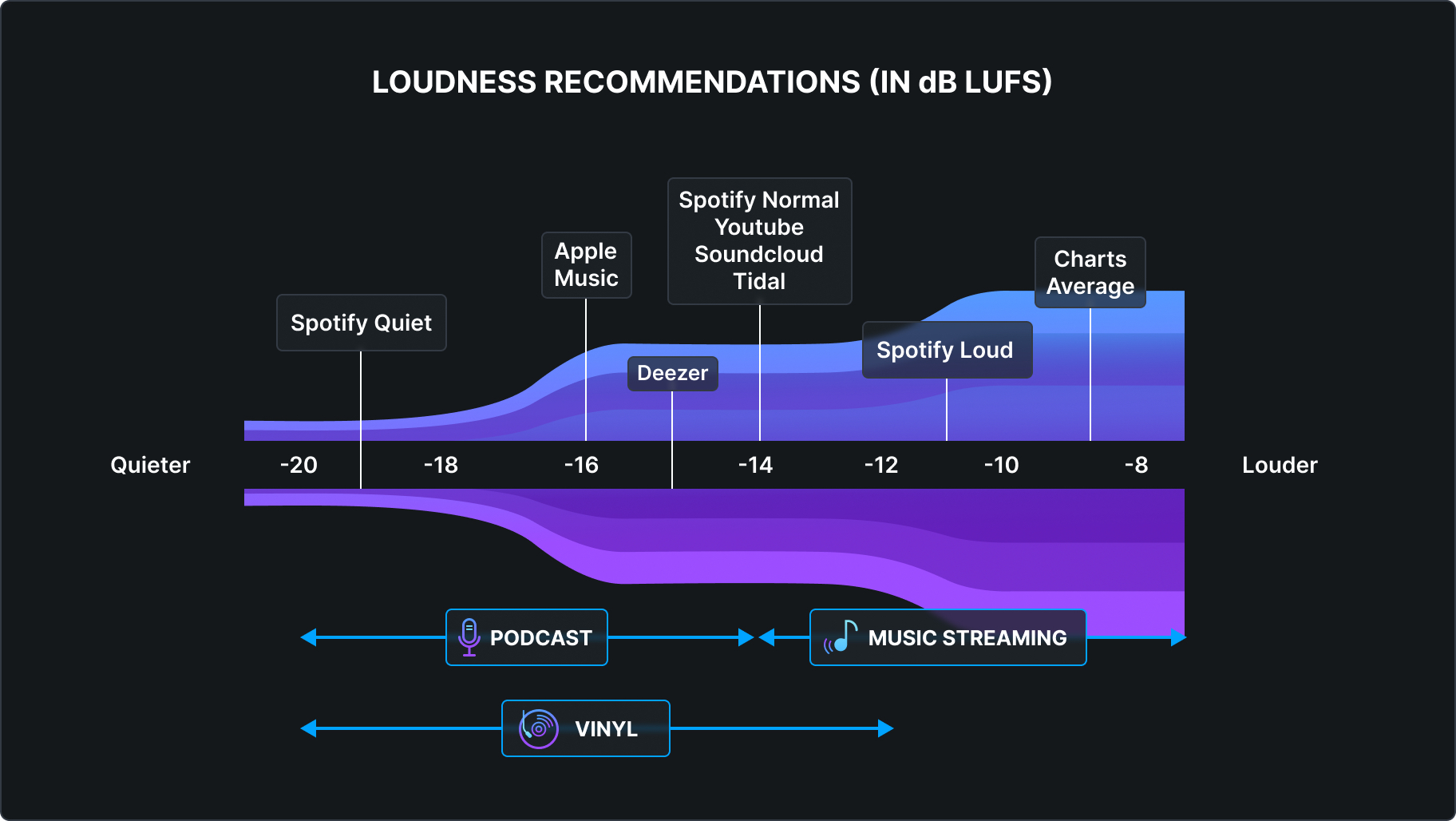
Loudness Target
Choose between three loudness profiles designed for common distribution scenarios:
Standard (-14 LUFS) — Ideal for most streaming and digital distribution platforms.
Medium (-11 LUFS) — Optimized for Spotify Pro.
Loud (-8 LUFS) — Suited for high-impact, chart-driven DJ and club tracks.
Advanced Controls
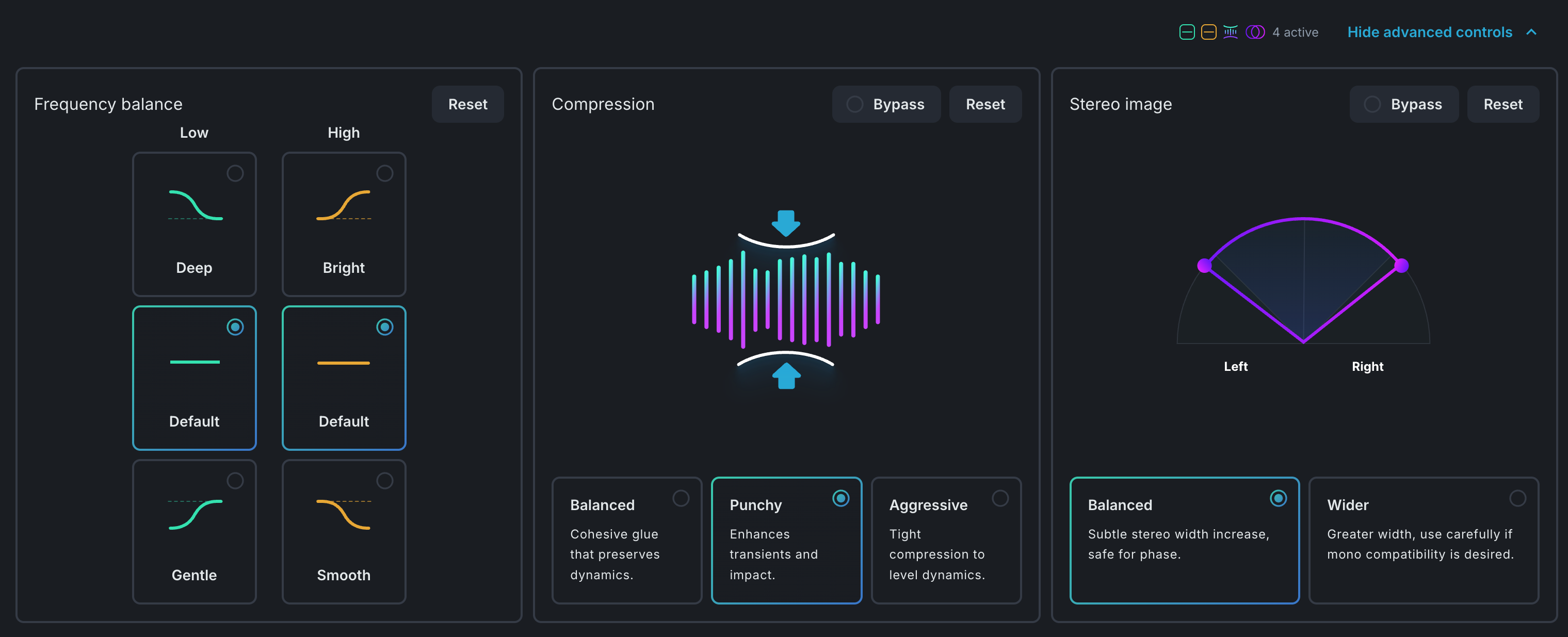
Clicking Advanced Controls in the lower-right corner reveals three additional categories of fine-tuning options.
Frequency Balance
Virtu gives you the ability to boost or reduce both low and high frequencies, allowing you to fine-tune the EQ profile of your master. When combined with the Style selection above, these adjustments can help you better tailor your master to specific genres.
Pop
- Deep: For modern and dynamic pop genres with an emphasis on low-end.
- Gentle: When a focus on vocals is desired.
- Bright: Ideal for high-energy, fast tempo songs.
- Smooth: Tames the highs—great for chill or electro-pop.
Rock
- Deep: Great for metal or heavy rock with solid low end.
- Gentle: Perfect for lighter or vintage rock.
- Bright: Boosts high mids—suits metal or energetic rock.
- Smooth: Focus on musicality, better for mellow rock styles.
EDM
- Deep: For bass-heavy mixes like trap or house.
- Gentle: Balanced and punchy—great for techno/dance.
- Bright: Emphasizes highs—perfect for DnB, dubstep, etc.
- Smooth: Softer highs, works well with chill BPM or experimental EDM.
Hip-Hop
- Deep: Emphasizes sub bass for modern hip-hop.
- Gentle: More midrange for lo-fi or old-school beats.
- Bright: Accentuates snares and hi-hats for modern clarity.
- Smooth: Warm tone for relaxed, classic vibes.
Universal
- Deep: Best for modern and dynamic productions with low-end focus.
- Gentle: Great for vintage sounds or slower music.
- Bright: Ideal for high-energy, rhythm-driven productions.
- Smooth: Good for slower instrumental and vintage-inspired tracks.
Instrumental
- Deep: Adds body to acoustic or orchestral recordings.
- Gentle: Best for classical recordings with midrange focus.
- Bright: Brings out rhythm and acoustic presence.
- Smooth: Mellow and ideal for soft classical pieces.
Compression
Virtu provides three compression options:
-
Balanced – Transparent “glue” that maintains the track’s natural dynamics.
-
Punchy – Accentuates transients for added impact and energy.
-
Aggressive – Tight, firm compression designed to reduce pumping artifacts.
If you’re unfamiliar with the concept of compression, feel free to explore our Academy course dedicated to understanding and using compression.
Stereo image
Virtu includes two settings for adjusting the stereo width of your master. You can also bypass this module entirely to keep the original stereo image unchanged.
-
Balanced – A subtle, phase-safe increase in stereo width.
-
Wider – A more pronounced widening effect; use thoughtfully as it may introduce phase issues.
Export
Clicking Finalize Master will process your track and ensure that the final loudness matches the selected target.
Once the mastering is complete, you can use the export button to save your audio file wherever you like, or simply drag and drop the mastered file out of Virtu—directly into your preferred DAW, for example.